TrendSpider Review 2025 – AI-Powered Trading Platform for Smarter Technical Analysis
TrendSpider is an AI-powered charting and technical analysis platform built to automate trendlines, alerts and strategy testing across stocks, crypto and other markets. It helps you design and verify your trading strategy, scan for setups in real time and react faster to price action so you can trade smarter and stay ahead of key market moves.
Introduction
TrendSpider is an AI-powered trading platform that aims to replace multiple charting tools, market scanners and strategy testers with one integrated solution. In this TrendSpider review 2025, the focus is on how the platform helps you build a trading strategy, analyze charts across multiple timeframes and use automation to save time in every market session.
Whether you trade stocks, ETFs, crypto or forex, TrendSpider offers advanced technical analysis, real time data integrations and AI tools to help you spot charting patterns, backtest ideas and even automate parts of your process. It is built for active traders who want more structure around their setups, entries and exits instead of relying purely on manual chart watching.
Importantly, TrendSpider is not a signal-selling service or a get‑rich‑quick scheme. It is a professional technical analysis platform that gives you better data, better tools and more automation, but you still remain responsible for risk management, position sizing and discipline in following your trading plan.
What Is TrendSpider and Who Is It For?
TrendSpider is a web-based trading and charting tool that combines technical analysis, pattern recognition and automation in one platform. The platform offers powerful features like multi timeframe analysis, automatic charting pattern detection and configurable market scanners designed to support a wide range of trading styles.
It is particularly useful for traders who are serious about refining their trading strategy and want to test ideas with data instead of guessing. Swing traders, day traders and even options trading enthusiasts can use TrendSpider to define rules, scan for setups that match those rules and then manage trades more systematically.
Instead of forcing you into a single way of trading, TrendSpider is flexible enough to support many different trading styles. You can build simple strategies based on a few indicators or candlestick rules, or design complex multi-factor systems that combine chart patterns, volume, and custom conditions.
The platform is particularly attractive for traders who are tired of manually drawing levels and hunting for setups across dozens of charts. By letting you automate much of the scanning and analysis work, TrendSpider frees up time so you can focus more on planning trades and managing risk.
It is not a broker and it does not execute trades by itself, but it integrates with several brokers and can power trading bots or automated alerts that help you react faster when the market meets your conditions.
Core Features & AI Tools
One of the biggest reasons traders choose TrendSpider is the combination of advanced technical analysis, automation and AI-powered tools in a single platform. Instead of juggling separate charting tools, market scanners and strategy testers, you can run almost your entire trading workflow from one place.
Using TrendSpider Across Different Trading Styles
Day traders can use TrendSpider’s real time data, market scanners and lower-timeframe charts to find intraday opportunities that match their rules. Swing traders may focus more on daily and weekly charts, using multi timeframe analysis and pattern recognition to identify bigger trend moves and key support or resistance levels.
For options trading, the platform helps you plan directional ideas and timing around volatility, even if you execute contracts through another broker. Long-term investors can still benefit from the charting tool, alerts and Sidekick-style AI tools to monitor big-picture levels and fundamental events without staring at screens all day.
Strategy Tester & Backtesting
TrendSpider’s Strategy Tester lets you turn almost any trading strategy idea into rules and backtest it on decades of historical price action. You can test entries, exits and filters across multiple timeframes, see win rates and performance metrics and quickly refine what actually works before risking real capital.
Because the Strategy Tester is no-code, it is accessible even if you have never programmed before, while still being powerful enough for advanced users to validate complex technical analysis setups. This makes it easier to move from subjective chart reading to a more data-driven approach.
Charting Tool, Multi Timeframe Analysis & Pattern Recognition
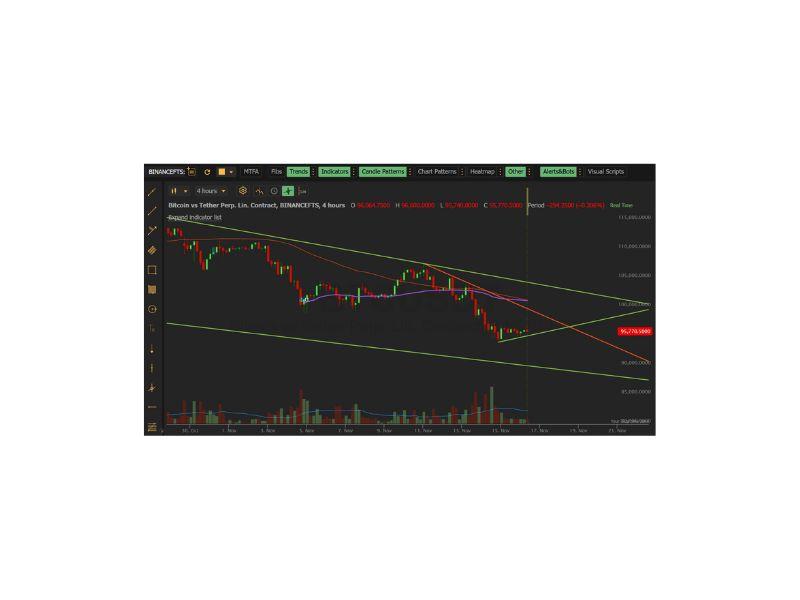
As a charting tool, TrendSpider stands out with multi timeframe analysis that lets you overlay higher‑timeframe levels and indicators directly on your working chart. This helps you align intraday setups with daily or weekly structure without constantly flipping between windows.
Built‑in pattern recognition automatically highlights key charting patterns, trendlines and zones, reducing the time you spend manually drawing levels. Traders can use these tools to filter noise, focus on cleaner setups and spot opportunities that match their trading style more consistently.
Market Scanners, Alerts & Trading Bots
TrendSpider offers powerful market scanners that search thousands of symbols in real time for conditions that match your predefined trading strategy. Once you define your criteria, the scanners continuously monitor the market and surface only the tickers that meet your rules.
You can then connect these scans to alerts and, in some cases, to automated trading bots, so that potential setups don’t get missed while you are away from the screen. This automation is especially useful for traders who follow several markets or use rule-based systems that depend on specific technical analysis signals.
AI-Powered Features & Training Sessions
On top of traditional tools, TrendSpider includes ai powered features such as AI pattern detection, AI-assisted indicator creation and other ai tools that help streamline analysis. These can speed up tasks like building custom studies, spotting unusual price action or generating signals based on complex multi-factor rules.
To help users get the most out of the platform, TrendSpider offers regular training sessions, webinars and educational content. This support is valuable for traders who are new to sophisticated software and want guidance on how to integrate the platform into their existing trading styles.
The AI components are not meant to be a magical black box that replaces your judgment, but rather a way to speed up tasks that would be slow or inconsistent by hand. For example, you can ask the system to highlight certain types of chart structures, generate custom indicators from a natural language description, or suggest ways to refine an existing strategy.
Regular live training sessions and educational content show practical workflows instead of just listing features. Watching how experienced users combine market scanners, strategy tests and alerts can shorten the learning curve and help you build a process that fits your personality and risk tolerance.
Pricing, Free Trial & Overall Value
TrendSpider offers several pricing tiers aimed at different experience levels, from part‑time traders to full‑time professionals. Each plan unlocks a set of tools and data limits, so you can choose the package that matches how often you trade and how deeply you rely on technical analysis.
There is usually a free trial period that lets you test the platform with real time data before committing to a paid subscription. Taking advantage of the free trial is the best way to see whether TrendSpider’s charting tool, market scanners and AI tools actually fit into your daily routine.
When you compare the subscription cost to paying separately for a charting platform, a backtesting tool, market scanners and third‑party alerts, the overall value can be compelling for active traders. If you trade regularly and make full use of the strategy tester, automation and AI features, it is realistic for the platform to pay for itself with just a few well‑executed trades per month.
User Experience & Learning Curve
Because TrendSpider packs a lot of functionality into one interface, there is a learning curve, especially if you are coming from simpler charting platforms. However, the layout is logically organized and most features are documented with step‑by‑step guides, videos and live training sessions.
Once you become familiar with the workflow, having your trading strategy, multi timeframe analysis, pattern recognition tools and alerts all in one place can save significant time. Many users find that centralizing everything on a single platform makes it easier to stay consistent and avoid jumping between multiple apps during the trading day.
Pros & Cons of TrendSpider in 2025
Like any trading platform, TrendSpider has clear strengths but also some trade-offs that may or may not matter depending on your goals. Looking at the main pros and cons can help you decide whether it is the right fit before you commit time to learning the software.
✅ Pros
- All-in-one environment: Combines charting, TA, strategy testing, scanners & AI tools.
- Multi-timeframe analysis: See higher-timeframe levels directly on lower-timeframe charts.
- No-code strategy tester: Easily backtest and refine strategies without programming skills.
- Strong automation: Dynamic alerts & trading bots help you catch moves 24/7.
- Ongoing education: Regular training sessions help you master advanced features.
❌ Cons
- Learning curve: The depth of tools can feel overwhelming for complete beginners.
- Subscription cost: Monthly price may be high for small accounts or casual traders.
- Best for rule-based traders: Traders who trade purely by "feel" might not need these systematic tools.
Final Thoughts: Is TrendSpider Worth It in 2025?
TrendSpider is best suited to traders who rely heavily on technical analysis and want to combine charts, backtesting, market scanners and AI-powered tools in one environment. If you enjoy building and refining rule‑based systems, testing ideas in the Strategy Tester and using automation to monitor real time data, the platform can justify its subscription cost.
More casual traders who just need basic charts may find the feature set overwhelming, but for active swing, day and options trading strategies, TrendSpider offers a powerful toolkit that can replace several separate services. Start a TrendSpider free trial to see how well the platform fits your personal trading style before making a long‑term decision.
As with any trading software, the real value you get from TrendSpider depends on how consistently you use it to plan, test and execute your ideas. Traders who treat it as a central hub for their technical analysis and continually refine their rules are likely to benefit far more than those who log in only occasionally.
TrendSpider FAQ 2025
Which markets can I analyze with TrendSpider?
TrendSpider supports stocks, ETFs, crypto, forex and some indices, depending on your data package. You can scan and backtest strategies across multiple markets from a single platform, which is why many TrendSpider review 2025 articles call it an “all‑in‑one” technical analysis hub.
Is TrendSpider good for beginners?
TrendSpider can feel advanced at first, but the no‑code Strategy Tester, pre‑built scanners and regular training sessions make it accessible for motivated beginners. Traders who are willing to learn rule‑based setups and follow a structured plan tend to benefit more than those who rely purely on intuition.
Do I need coding skills to use TrendSpider?
No. Most features, including the Strategy Tester and market scanners, use visual builders and menus instead of programming. You can define entries, exits and filters using dropdowns and conditions, which is a major advantage for traders who want to backtest ideas without learning a coding language.
Does TrendSpider replace my broker?
TrendSpider is a charting and analysis platform, not a broker, so it does not hold your funds or execute trades by itself. You continue placing trades through your existing broker, while using TrendSpider for charting, alerts, backtesting and automation of your analysis workflow.
Is there a free trial for TrendSpider?
The official website typically offers a limited free trial so you can test charts, scanners and AI tools with real‑time data before paying. This trial period is the best opportunity to check whether the platform fits your day‑to‑day routine and trading style.
Is TrendSpider worth it for small accounts?
For very small or occasional traders, the subscription cost may feel high if they do not fully use backtesting, scanners and automation. For active swing and day traders who rely heavily on technical analysis, replacing multiple tools with one platform can justify the price if it helps avoid mistakes and find better‑timed trades.
Does TrendSpider guarantee profitable trades?
No trading platform can guarantee profits, and TrendSpider is no exception. It provides better tools, data and automation, but risk management, position sizing and psychological discipline remain